Your AI assistant has never met you

Last week I asked Claude to write a follow-up email after a call. It wrote a good one. It was also addressed to the wrong person, referenced a decision we had reversed two days earlier, and thanked everyone for a discussion that never happened.
None of that was Claude's fault. I had given it four sentences and quietly expected it to know my week.
That is the odd shape of the last couple of years. The models got startlingly good at reasoning and stayed completely blind to context. So we compensate by hand. We copy the Slack thread. We paste the stack trace. We describe the meeting from memory, badly, because we were half listening. Some of the smartest software ever built, and we spend our days being its assistant.
Meanwhile there is an application sitting on my PC that already knows all of it. It saw the call. It read the error. It has the thread, the correct spelling of the name, and the two days between the decision and the reversal. It just had no way to say any of that out loud.
A protocol with a boring name
The thing that fixed this is called MCP — the Model Context Protocol. It is not exciting technology, and I mean that as a compliment. It is a convention: an agreed way for an assistant to say “I need to look something up” and for a tool on the other end to answer. That is roughly the whole idea.
Its value was never cleverness. Its value is that everybody agreed. Standards are boring the same way plumbing is boring — you only notice them when you have to live with the alternative, which in this case was a different bespoke integration for every assistant, forever.
So we taught Perfect Memory to speak it
Perfect Memory is now an MCP server. Claude Desktop, Claude Code, ChatGPT, Cursor, the Codex CLI — if it speaks MCP, it can ask your memory questions. One connector URL, and your assistant gets five tools it can reach for on its own, without you telling it which one to use:
- search_history — find moments across everything that has been on your screen: apps, documents, web pages, messages.
- get_moment — pull the full text of a single moment, for when you need the exact number, quote, or error string rather than a summary of it.
- get_timeline — replay a stretch of time in order. This is the one that writes your standup.
- search_meetings — find a call by topic, attendee, or date, and get back the summary, key updates, and action items.
- get_meeting — one meeting in full, transcript included.
You do not learn any syntax. You ask the way you would ask a colleague who happened to be watching over your shoulder all week, and never got bored.
The part we argued about
Here is where this got uncomfortable, internally. The easy way to build this feature is to upload your screen history somewhere central, index it there, and let assistants query the index. It is easy because somebody else's computer is always easier. It would also mean a copy of everything you have ever looked at now lives on our servers, which is precisely the product we set out not to build.
So the cloud does not get a copy. It gets to be a wire. Your assistant's request is authenticated and forwarded to the Perfect Memory app running on your machine, the search happens there, and the answer travels back along the same path.
Screenshots, OCR text, transcripts — none of it moves. If your PC is asleep, nothing can be searched, by us or by anyone else. That is not a limitation we papered over; it is the design working as intended. You can read the longer version in private by design.
One minute of setup
First, tell the app it is allowed to answer. In Perfect Memory, open Settings → Advanced and switch on Enable MCP server.

Then generate a connector URL on your account page. It looks like this:
https://proxy.perfectmemory.ai/api/mcp/u/<your-token>Copy it straight away — it is shown once. Treat it like a password, because that is what it is.
Finally, paste it into your assistant. In Claude Desktop that is Settings → Connectors → Add custom connector:
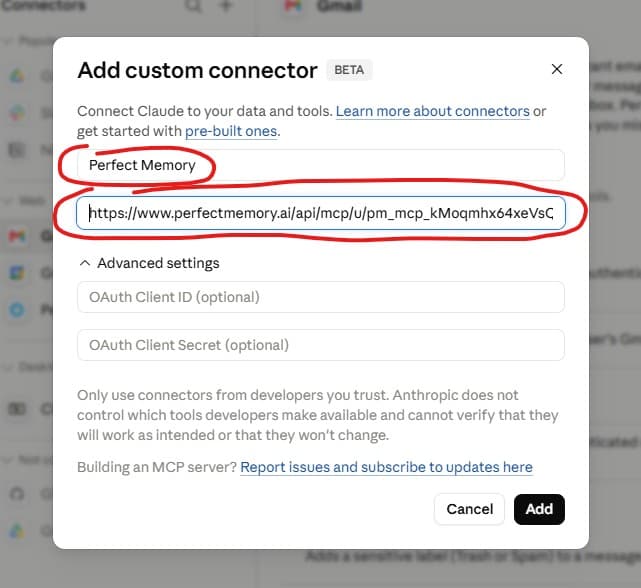
In Claude Code it is one line in a terminal:
claude mcp add --transport http perfect-memory https://proxy.perfectmemory.ai/api/mcp/u/<your-token>When the app and the connector have found each other, the card on your account page turns green. That pill is the honest indicator of whether anything can be searched at all — if it is grey, your assistant will politely come back empty-handed.

What it actually feels like
The first morning it worked, I typed “what did I work on yesterday? Write my standup” and went to get coffee. I came back to three bullet points that were correct, including a fifteen-minute detour into a config file that I had genuinely forgotten about. It was useful and very slightly unsettling, in the way of being reminded of something you were sure you had never known.
Since then the queries have become mundane, which is the real measure of whether a feature landed:
- “What was that pricing table I saw on a competitor's site last Tuesday?”
- “Find the API endpoint the backend team pasted in Slack last week.”
- “Summarize my 1:1 with Dana and list what we agreed on.”
- “I had a Visual Studio error on Thursday afternoon. What did it say, exactly?”
Notice that none of these are questions about the world. They are questions about your week, and until now there was no one to ask.
The honest limits
Three things worth knowing before you turn it on.
Your PC has to be awake. Searches run on your machine, so a sleeping laptop means no answers. This is the direct cost of not keeping a copy in the cloud, and we think it is worth paying.
The connector URL is a credential. Anyone holding it can query your memory until you rotate it. Rotating takes one click on your account page, and old URLs die immediately.
It only knows what you saw. Perfect Memory is a record of your screen, not an oracle. If it happened in a room, on your phone, or in an app you excluded, it is not in there — and your assistant will tell you so rather than invent it.
Go and connect something
Your assistant still has not met you. But for the first time it knows how to ask, and the answers come from a machine you own, in a house you control.